

Block Visibility 3.6.0 includes new rules for the Location control and several enhancements under the hood. This release also marked the 50th version of Block Visibility, and you can view the complete changelog on GitHub.
New Location rules
The most significant improvement involves taxonomy archives. Consider the situation where you want to display different content depending on whether the current taxonomy term is a parent, a child, or if it’s a parent or child of another specific term. This is often used to show different navigation menus and contextual elements.
With the new Term Hierarchy, Relative Term Hierarchy, and Supports rules in the Location control, this functionality is now possible.
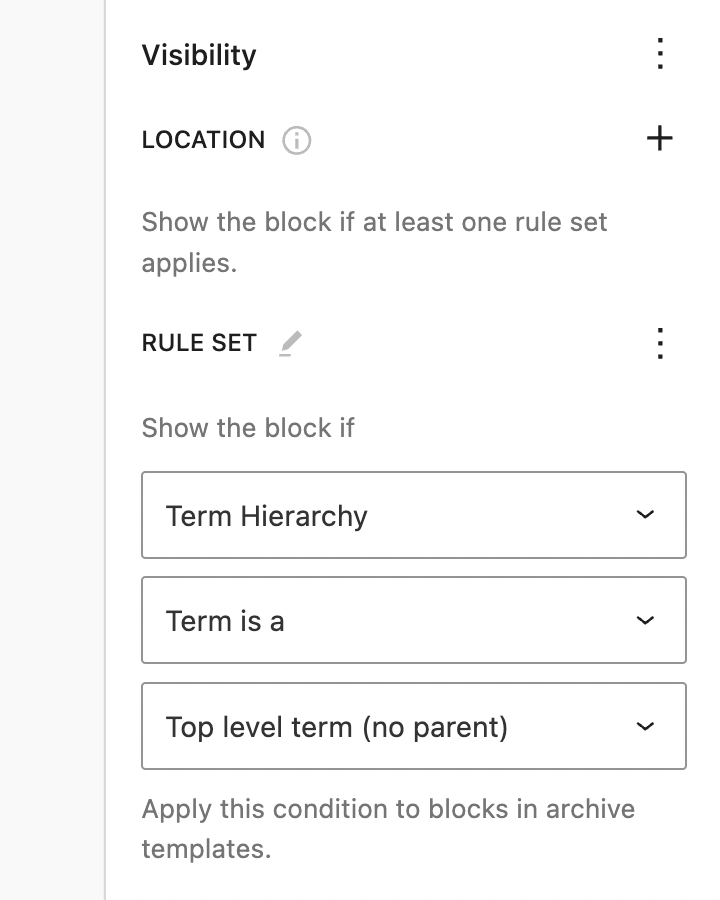


You can also now conditionally display blocks based on whether the current post has an excerpt. This is useful in Post templates and Query blocks.

Next steps
The ongoing development of Block Visibility will focus on enhancing current functionality and adding new features to existing controls. No new integrations are planned. The goal is to make each existing control as feature-rich as possible while ensuring the plugin feels like a native Core add-on.
If you find a bug or have a feature request, please submit a support ticket or create an issue on the Block Visibility GitHub repo. Pull requests are always welcome. If a feature you want is taking too long to build, I encourage you to become a contributor.
Until next time. 👋


Share Your Thoughts